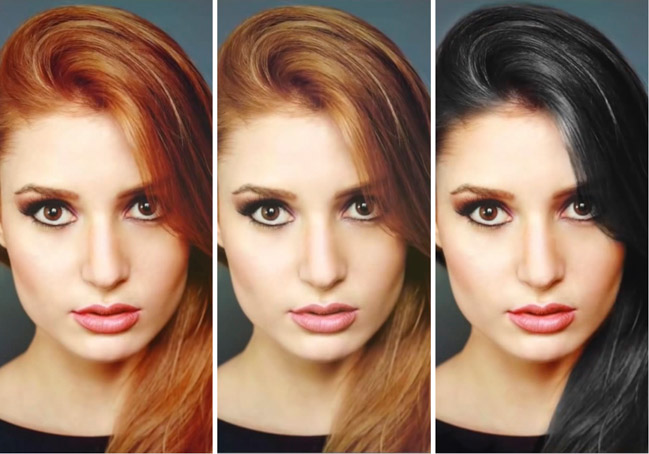

It is, perhaps, the most common style manipulation that most people do – changing hairstyles. From cuts, to styling, and of course, coloring, hair tends to be something we (almost all of us) have, that can affect a dramatic aesthetic difference with relative ease.
There are bounteous reasons why you might want to alter hair color in your images. You may be going for a specific color palette for the entire shoot to adhere to a theme and the model doesn’t have the right shade required or a wig; perhaps the model in question recently changed the color of their hair and it’s not right for the shoot; maybe the photo was captured in a way that dulled or gave the hair a hue that is unwanted; or of course, you’d just like to see what you or someone else may look like as a test before heading to the salon. Thankfully, it’s not difficult for this alteration to be done in Photoshop, and Phlearn’s Aaron Nace will guide you through.
Things To Consider
From the start, Aaron makes it clear that it’s distinctly easier to manipulate and change the color of light hair, versus dark, and especially black. He says going from black hair to blonde is a terribly arduous task and as such it’s not touched upon in this tutorial. The darker the hair the less information there is to alter, and thus less detail, which makes the render appear less real.
[REWIND: Before & After Photoshopped Images – An Ethical Dilemma ]

He also is sure to point out that with a color change it’s important to beware of over saturation. In order to keep the result realistic, there will need to be different levels of lights and darks, along with variances in the hues themselves, and saturating too much is a road to fake looking hair.
Nace suggests opting out of the ‘Hue Saturation’ adjustment layer and instead opting for that of ‘Selective Color,’ as it allows for more subtle control. That’s just one of the side tips Aaron divulges in the video, which has other small bits that many aren’t aware of, but are tremendously helpful and applicable in other Photoshop dealings, such as how to copy/apply a layer mask setting easily from one layer to another.
It’s one of Aaron’s great videos explained with care and detail, and as always, easy to follow along with. If you are a fan of Aaron’s teachings (and who isn’t?), be sure to check back here for updates, and follow along with Aaron on YouTube and Phlearn. You should also consider becoming quickly adept at Photoshop with the Phlearn Photoshop 101 & 201 sets as they are very comprehensive, and will have you doing things with Photoshop you may have otherwise thought too complex, or didn’t even know you could do.
Source: Phlearn