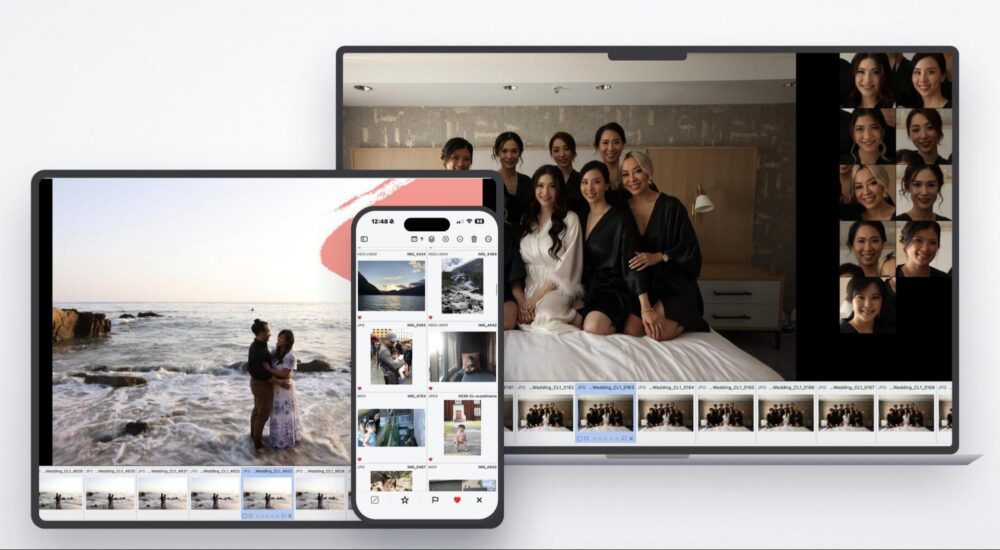
Most tools that promise to fix problems in post generally deliver on that promise, eventually. Noise reduction got better. Sky replacement definitely improved. Even frequency separation and skin retouching have reached a point where the results are genuinely convincing. Lighting, though, has always been the exception; that looks poised to change, however, with the launch of Vividon.
Vividon, a Stockholm-based company founded by photographers and film and television industry veterans, together with AI engineers and computer vision specialists, has opened early access to its AI relighting plugin for Adobe Photoshop. With this tool, you can now change the light in any image, after the fact, without prompts or a complicated new workflow, and without touching the original file. It runs entirely inside Photoshop as a plugin, which means no new software to learn and no disruption to an existing editing setup.
How Vividon Works
The fastest way to understand Vividon is to think about how lighting decisions normally get made. On a shoot, you are choosing direction, intensity, and mood in real time, often under pressure. In post, that window is usually closed. Vividon reopens it.
The interface centers on a curated library of professional lighting setups, spanning studio, environmental, and cinematic styles. You can browse and apply these setups visually rather than building them from scratch or describing them in a text prompt. Whatever you select lands on its own dedicated Photoshop layer, fully editable and non-destructive. The original file is never touched and every adjustment you make after the fact works exactly as it would with any other layer in your document.
Two features go beyond the preset library and are worth understanding on their own terms.
First, Match lets you pull the lighting characteristics from any reference image you already own and apply them to new work. If your portfolio includes a shoot from a few years back with exactly the quality of light you are chasing on a current project, that is now a starting point rather than a happy accident you cannot reproduce. This is great news for photographers working to maintain a consistent visual identity across a body of work or a long-term client relationship. Match offers a more direct path than trying to approximate a feeling through manual adjustment.

Next, the custom environment builder goes the other direction, giving photographers a way to design and save their own signature lighting setups from the ground up for those who want to move beyond the built-in library entirely.
Who Built It and Why
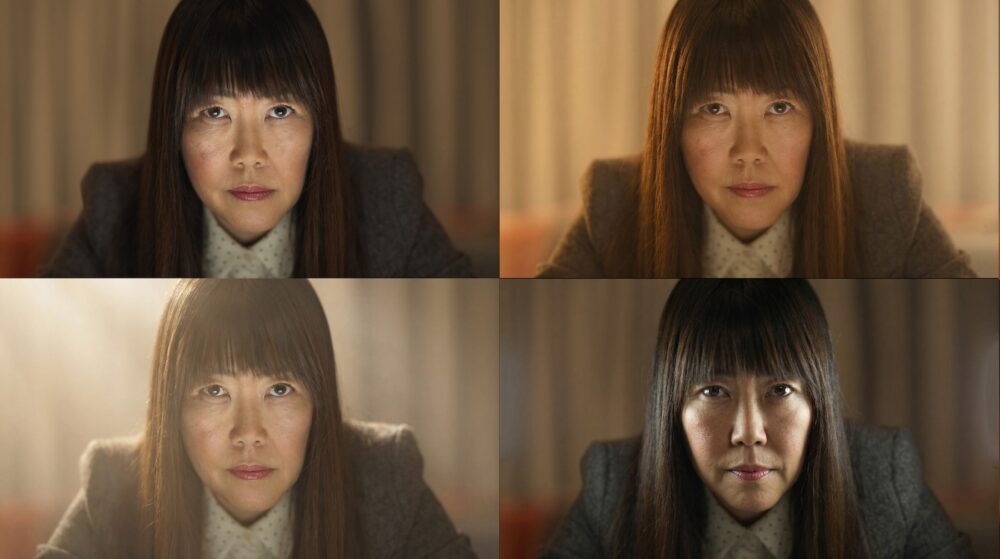
The team behind Vividon is not coming at this from a purely technical direction. The founders have backgrounds in photography, film, and television, and the tool was developed in close collaboration with working retouch studios and professional photographers who tested it under real production conditions. That context matters because it shapes what the product actually prioritizes: speed, precision, and creative control that feels native to how photographers already think about light, rather than a feature set designed to impress in a demo (although the demos ARE impressive).
“We got tired of watching great work stay just out of reach,” says co-founder and CEO Tomas Axelsson. “Wrong light. No time. No budget for a reshoot. Our job is to remove that friction and give photographers back the time and budget that lighting has always consumed.”
Co-founder and Chief Innovation Officer Marcus Kurn frames the commercial case plainly: “Once you start delivering two or three lighting variations with every final image, your clients will never want to go back.”
Early Reception

The industry response since launch has been noteworthy. John Nack, a former Photoshop product manager at Adobe and currently a senior AI production manager at Google, wrote about Vividon on his blog shortly after launch, describing the experience as “no prompting, no friction, just incredible results.”
One response that stood out came from Huang Kai, a professional photographer based in Taiwan, who shared his experience publicly and then wrote to the company directly:
“Vividon has helped me far beyond post-production. When shooting spaces, I constantly find myself thinking: if only there were a perfect beam of sunlight from this direction. Vividon lets me visualize those possibilities and understand how light and shadow could interact naturally within a space. It helps me prepare better for future projects, predict conditions, and explain to clients that beautiful natural light requires both the right environment and a little luck. It has improved how I think during pre-production.”
That last observation is worth sitting with. The tool is designed to solve a post-production problem, but Huang is describing something that feeds back into how he shoots and plans. That kind of creative loop is not something you typically get from a retouching utility.
Pricing and Availability
Vividon is available now in early access at vividon.ai. A free tier with 30 credits is available without requiring a credit card. This should give you enough testing room to run it against your own images and get a genuine sense of the results before committing to anything. Paid plans are credit-based and currently offered at early access pricing for founding users, ranging from $10 per month with 130 credits up to $55 per month with 950 credits, with additional credits available separately.
Final Thoughts
AI tools that tackle genuinely hard problems are worth paying attention to, and lighting has always been one of the hardest. The fact that Vividon requires no prompting, runs non-destructively inside Photoshop, and was built by people with real production experience puts it in a different category from a lot of what is currently out there. It is early, and the tool will likely evolve a bit before it reaches full release. Still, the foundation is solid and the direction is clear.
Either way, the direction Vividon is heading is one worth watching.