

For all types of photographers, the cutting-edge tools that AI has brought to us have been a game-changer. Even if you’re opposed to generative AI and/or data centers, we’ve seen what is possible when we add “machine learning” to things like our cameras’ autofocus systems. The ability to recognize subjects in any scene is, simply put, making our lives much easier.
Today we are reviewing DxO PhotoLab 10, and the new AI tools it offers are in that same vein. Even for a purist photographer, the ability of this AI to recognize what is in an image is going to change how you edit your photos. Spoiler alert: tools like depth masking, people selection, and a handful of other improvements are going to make DxO PhotoLab 10 attractive to almost any photographer.
Of course, DxO PhotoLab is not just another AI photo editing engine; indeed, far from it. Built by photographers, for photographers, long before AI was a thing, DxO built its reputation on one of the best raw conversion engines on the market. It is also one of the only raw processors that gives you extensive control over lens correction profiles for both your modern mirrorless glass and your old, classic DSLR and SLR lenses, at a time when other raw software is essentially “locking out” users from even seeing the corrections it applies automatically.
Finally, DxO is one of our favorite editing ecosystems because of the other crown jewel in its raw workflow: one of the deepest catalogs of traditional film photography “looks” that we know of. (More on exactly how that works, and what it costs, further down.)
Labor Day deal
From September 4 through September 7, 2026, SLR Lounge readers can take 20% off DxO PhotoLab 10 and other DxO software with the code SLRLoungeLD2026 at dxo.com. The offer is for new customers only and expires at the end of the day on September 7. And if you miss the sale, you can use SLRLOUNGE for 15% off any DxO software year-round, for new customers only.
Buy DxO PhotoLab 10 Elite | Download the free 30-day trial
With that in mind, let’s get into our DxO PhotoLab 10 review. Whether you’re a beginner who wants a simple editing workflow with an incredible array of creative tools, or you’re a high-end professional who is meticulous about color response, tonal control, and the balance of noise and detail, you definitely need to read on.
DxO PhotoLab has been around for many years, as we mentioned, and it has always had a superb reputation for pulling the best possible image quality out of your camera’s raw files. From the earliest days of raw conversions that offered lens correction profiles, DxO was at the forefront of the race for maximum image quality.
Newer versions have kept DxO’s raw conversion right where it has always been, with some of the best noise reduction and detail enhancement tools on the market. DxO also offers optimized raw conversions for different sensor types, such as Fujifilm’s X-Trans sensors, and in recent releases those different conversion options have become available across virtually all camera types. That once again puts DxO in the top seat when it comes to giving photographers real control over how their raw files get converted.
Today, however, we’re looking at the latest additions and improvements in DxO PhotoLab 10. Before we get into that, let’s answer the underlying question: what is DxO PhotoLab?
DxO PhotoLab 10 is a comprehensive photo editing application that offers a complete, start-to-finish workflow. Within PhotoLab, you can import and back up new photos, and browse your existing photos and old archives. You can organize, cull, and handle the basics such as keywording or applying star ratings to your best images.

The PhotoLibrary tab handling a real working folder of 2,912 raw files, with star ratings, keywording, the histogram, and full EXIF all in one panel. This is a complete workflow app, not just a raw converter.
We pointed PhotoLab at a full wedding folder rather than a tidy sample set, and the PhotoLibrary held up. Star ratings, keywords, the histogram, and the full shooting metadata for the selected frame all live in one place, which is really all most of us need before we get to the part that matters.
Then, of course, the DxO raw conversion step is where the magic happens. Whether you want simple color correction, or you’re looking to emulate a very specific film stock (negative, transparency, or black and white), DxO PhotoLab is one of the best options around for editing, aka converting, your raw photos.
Finally, PhotoLab 10 offers advanced tools for very specialized edits such as burning and dodging group portraits, balancing complex landscape scenes, and so on. You can then export your files as JPGs, ready to share online or deliver to clients, or hand them off to another app such as Photoshop or Affinity Photo for final retouching.
All in all, DxO PhotoLab is unlike any other application. In a world of innumerable new software choices popping up, especially those coded by AI and/or using AI to edit your photos for you, DxO PhotoLab 10 is a heavy hitter in the same league as Lightroom, Capture One, and the rest.
- OS COMPATIBILITY: Windows and macOS (Editor’s note: confirm the exact minimum OS versions from the installer or DxO’s system requirements page before publishing.)
- PRICE: $159.99 (Essential) / $249.99 (Elite). Upgrades from PhotoLab 8 or 9 start at $84.99 (Essential) and $129.99 (Elite). Perpetual license, no subscription required.
- INTERFACE: Two-tab workflow, PhotoLibrary for browsing and organizing, Customize for editing, with collapsible tool palettes
- INTEGRATION WITH OTHER APPS: Direct export to Affinity Photo (coming soon in version 10’s upgrade), Photoshop, and Lightroom Classic; also works alongside DxO FilmPack, ViewPoint, and the Nik Collection
- KEY FEATURES: AI masks including depth masks, people and per-person selection, facial feature selection, background, sky, animals, and vehicles; advanced color grading wheel; AI sensor dust removal; DxO Optics Modules; built-in preset library
- FILE COMPATIBILITY: RAW, DNG, JPG, TIF, HEIC
- FREE TRIAL: 30 days
By far, the biggest leap forward in DxO PhotoLab 10 is its new AI tools. These are serious photography tools, yet they sit in an accessible interface that will allow even beginners to get through the learning curve rapidly.
We first saw AI masking arrive in DxO PhotoLab 9, and that was already a game-changer for tasks such as burning and dodging a portrait. Today, the people selection tools are considerably more refined, offering better results and a much broader depth of selection options, which we’ll get into next.
One of the most exciting features, however, is aimed at general photographers, landscape shooters, and really anyone who works with depth in a scene: depth masking, which uses AI to let us apply edits along our image’s plane of focus with incredible, uncanny precision.
The three headline additions in version 10 are depth masks, an advanced color grading tool, and a significant expansion of the AI masking toolkit. There are also a number of smaller quality-of-life improvements that we’ll cover further down.
Depth masking is the feature we were most curious about, and it’s the one that surprised us the most.
Here’s what DxO says it does: PhotoLab 10 analyzes your raw file and generates a depth map from it, then lets you make selections based on distance from the camera. You can independently target the foreground, the midground, or the background. Crucially, this does not require any embedded depth data from your camera, so it works on files from cameras that have no depth capture capability at all, including older bodies.
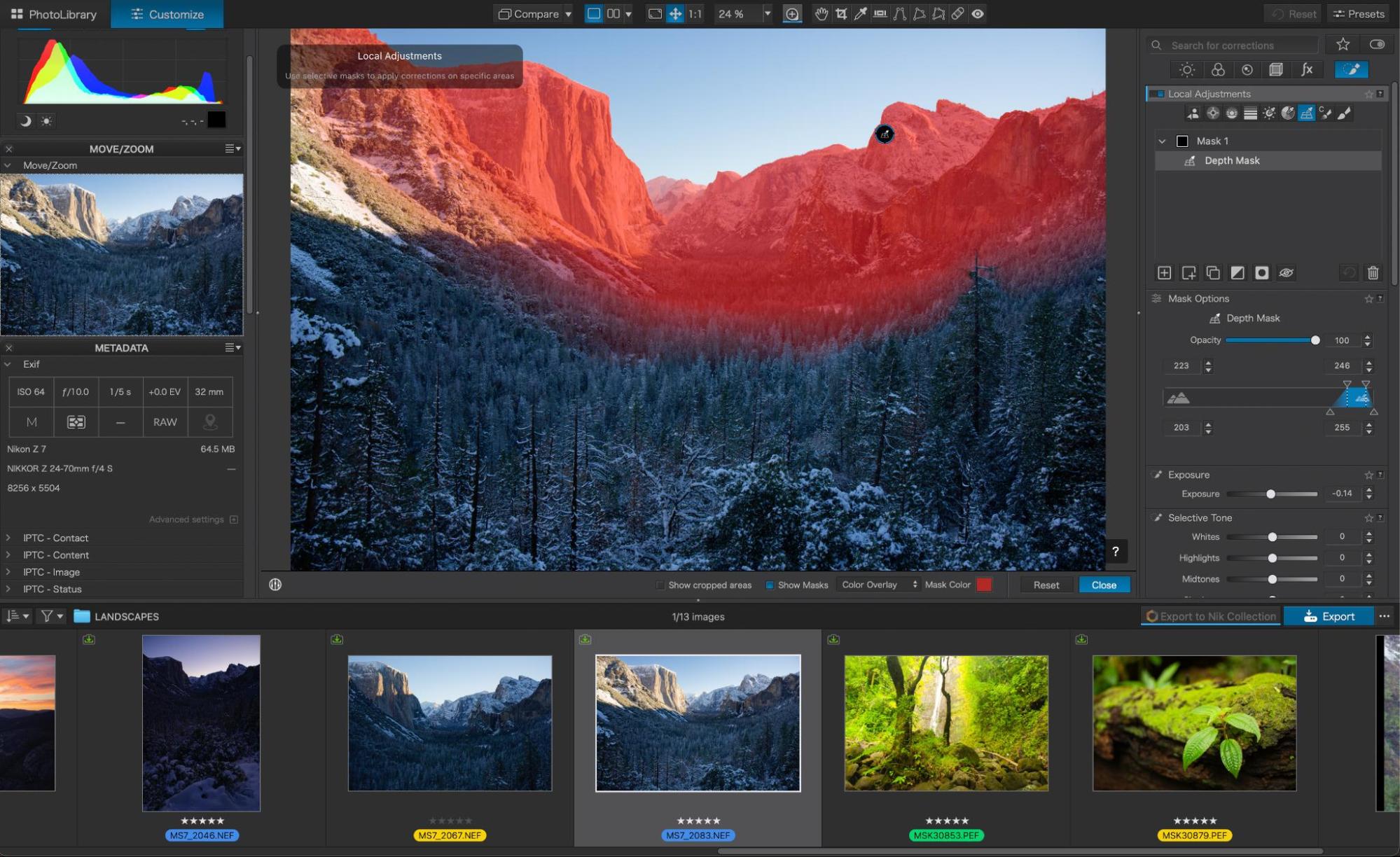
A depth mask isolating the far canyon walls in Yosemite Valley. The red overlay stops at the treeline, and the depth range sliders at right are the entire interface for that selection. Nikon Z7 with the 24-70mm f/4, and the file carries no embedded depth data of any kind.
Here’s what that means in practice. Look at that valley shot above. The red overlay is sitting on the granite walls and the far ridgeline while leaving the snow-covered forest in the near and middle distance completely untouched. Selecting that by hand means tracing a treeline made of several thousand individual conifers. With a depth mask, it took two sliders.
If you’ve ever tried to darken a busy background behind a subject, or lift the foreground of a landscape without touching the mountains behind it, you know the drill: a linear gradient is too blunt, and a hand-painted mask around a tree line takes forever. Depth masking sidesteps both. You pick your depth range, and PhotoLab isolates everything sitting at that distance, even when the edges are messy.
The transitions are the part worth calling out. Because the mask is built from a continuous depth map rather than a hard subject edge, the falloff between the selected and unselected areas is gradual and natural. That is exactly what you want for atmospheric adjustments like adding haze separation to a landscape, or gently dropping the exposure on a background so a portrait subject steps forward. The two pairs of range values you can see in the panel let you set both the core of the selection and how quickly it feathers out, so you can go from a hard cut to a very soft transition without touching a brush.
It is not magic in every situation. Scenes with a lot of fine, overlapping detail at similar distances (think branches against a hedge) will still need refinement, and that’s what the U Point tools are there for.
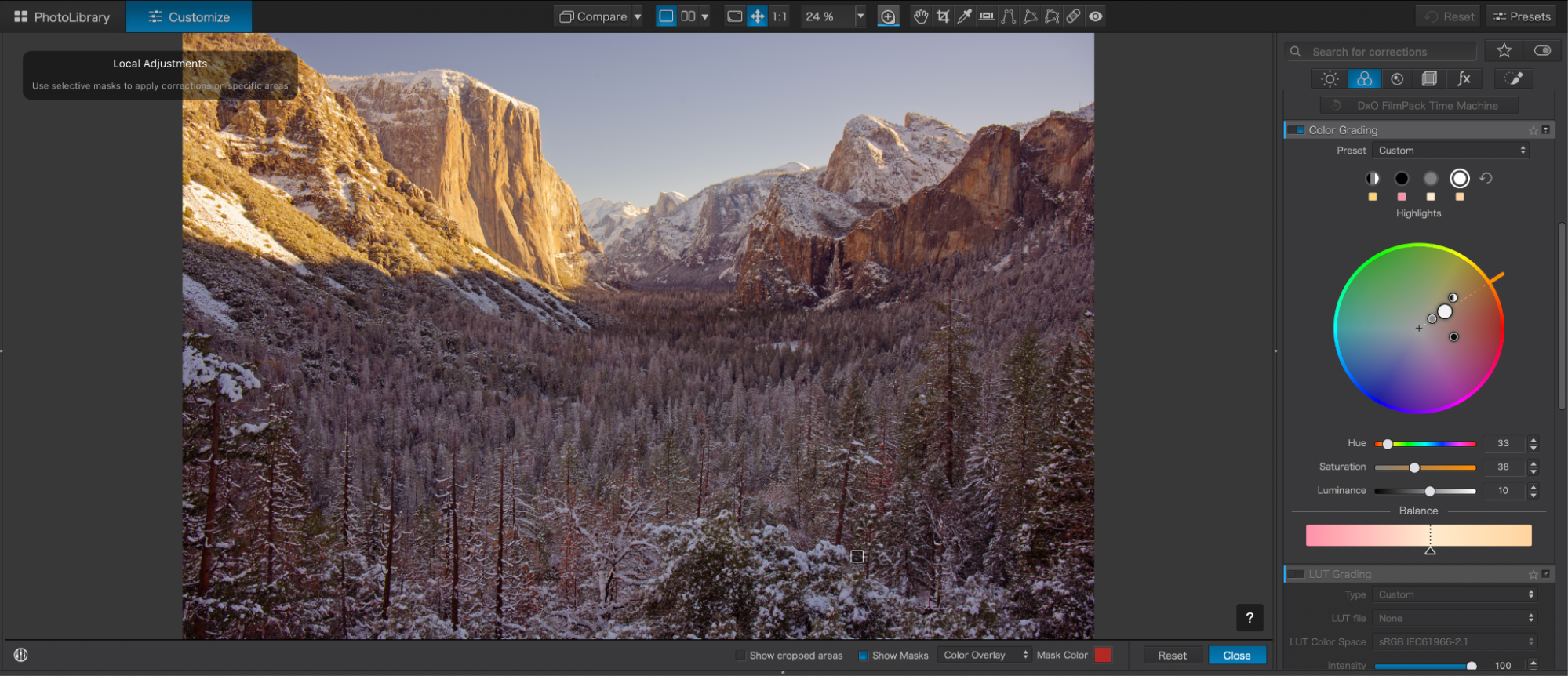
The new Color Grading panel, set to Highlights. Each tonal range gets its own handle on the wheel along with hue, saturation, and luminance values, and the Balance slider underneath controls where the shadow and highlight grades meet. LUT Grading sits directly below for anyone importing looks from a video workflow.
The second major addition is the new color grading tool. PhotoLab already had a color wheel for targeting specific hues, and that hasn’t gone anywhere. What’s new is a separate, tone-based grading wheel that gives you independent control over your shadows, midtones, highlights, and global color balance, all in one place.
If you’ve done any color grading in video, this will feel immediately familiar. Push the shadows toward teal, warm the highlights slightly, and you’ve got a look. What we appreciate here is that the adjustments can be linked across tonal ranges, so you can shift an entire grade at once while keeping the relationships between your shadows, mids, and highlights intact. That is genuinely useful when you’re trying to build a consistent look across a full gallery rather than a single hero image.
For wedding and portrait photographers, this matters more than it might sound. Most of the “look” that separates one photographer’s work from another’s lives in the shadows and the highlights, not the midtones. Having a proper tone-based grading wheel inside your raw converter means fewer trips out to another application just to get the color where you want it.
It also pairs directly with the preset library we’ll cover shortly. Start from a preset that gets you 80% of the way there, then use the grading wheel to push the shadows or highlights the last little bit toward your own signature look.
The expansion of selection options, and the impressive precision, is our primary reason for suggesting that everyone check out DxO PhotoLab 10, including existing users on a previous version. Simply put, if you ever find yourself manually performing selection and masking tasks like this, then PhotoLab 10 will pay for itself in virtually no time.

The Custom Mask Creation panel on a four-person family portrait. PhotoLab found every face in the frame and offered each one as its own selectable thumbnail, and the Mask Components list below shows exactly what it can isolate on the person you pick.
That single panel is the best summary of what changed in version 10. PhotoLab detected all four people in the frame and gave us a row of thumbnails: All, then each person individually, numbered. Choose All and you get one mask covering the whole group. Choose one person and you get just that person. Tick Create individual masks and you get a separate mask for every face at once, which is the option that saves the most time on a wedding day.
Then there’s the Mask Components row underneath, and this is where it gets almost absurdly granular. For the selected person, PhotoLab offers Entire Person, Face, Face skin, Hair, Eyebrows, Iris and pupil, Sclera, Teeth, Facial hair, Lips, and Clothes, with a count next to each one showing how many it found. Note that facial hair is greyed out at zero on the person we selected, because he doesn’t have any. The software isn’t offering you a generic menu, it’s telling you what it actually found in your frame.
Here’s what that toolkit means on a real job:
- Mask an entire group at once. One mask covering every person in a group photo, for when you want to burn and dodge an entire family formal at a wedding.
- Mask individual people separately. Individual masks for select people in a group portrait, for when one person is standing in a patch of sun and everyone else is in shade.
- Mask specific facial features. Whiten teeth, add a touch of brightness to the sclera, deepen the iris, or warm the face skin without touching the clothing beside it.
- Refine any AI mask with U Point. DxO’s U Point technology, which selects based on color and luminosity, can now be used to clean up an AI mask rather than replacing it. There’s also a new Control Brush that combines brush painting with U Point selection, and Control Points now come in elliptical shapes as well as the original circles.
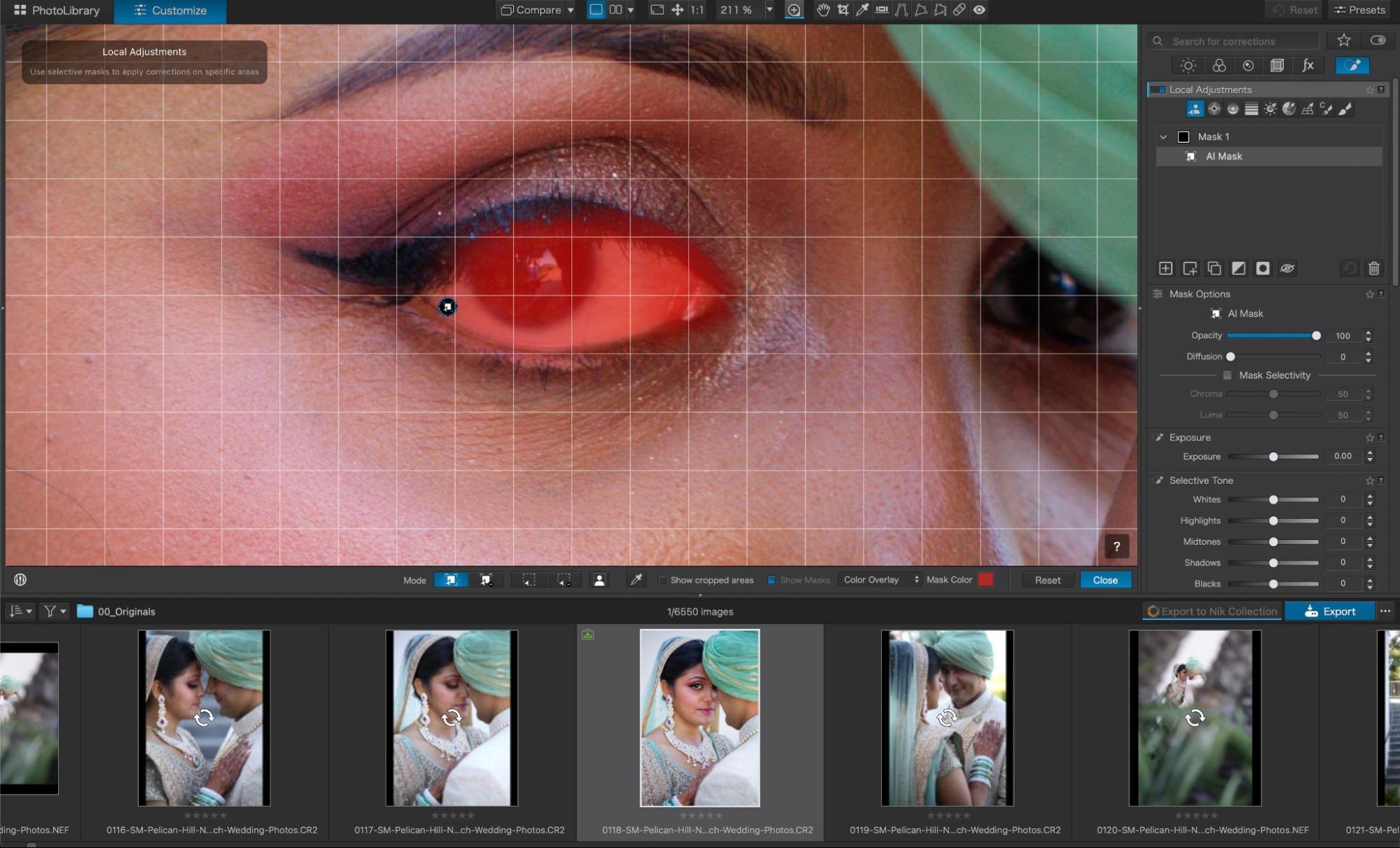
An AI mask on a single iris, viewed at 211%. The Mask Options panel on the right gives you opacity, diffusion, and chroma and luma selectivity to refine the edge, on a selection PhotoLab generated in one click.
The eye above is the granularity test, and it passed. That’s a mask on the iris alone at 211% zoom, generated in a single click, with the diffusion and selectivity controls right there to soften the edge so the adjustment doesn’t look pasted on. Anyone who has spent an evening hand-painting catchlights will understand why this matters.
One thing we noticed is this: DxO PhotoLab 10 is smart enough to recognize when you’ve cropped a photo in such a way that one of the masked subjects is no longer in the frame. That kind of small detail is what streamlines a professional portrait workflow, shaving real time off the process of perfecting lighting and skin across an entire shoot.
The other AI addition worth its weight is automatic sensor dust removal. PhotoLab 10 detects and removes sensor spots at the raw level, and it can run across a batch. This is one of the most frustrating tasks in photo editing, with literally zero creative payoff, so we are always thankful to see time savings here. If you’ve ever shot an outdoor wedding at f/16 and then found the same four dust spots in 900 files, you already understand why this is worth mentioning.
Every review of every editor eventually gets to the before-and-after section. PhotoLab makes that section slightly redundant, because the preset browser is a before-and-after view, rendered live on your own photo.

The Presets browser rendering every look as a live thumbnail of the image you have open. “6 – No correction” sits right there in the grid as your baseline, so you are comparing looks against your own untouched file rather than against a sample image from a marketing page.
Open the Presets panel and PhotoLab renders every available look as a thumbnail of the frame you’re working on. Not a stock sample image, not a generic swatch, your photo. And DxO includes 6 – No correction in the grid alongside everything else, so your untouched baseline is sitting right there for comparison while you scroll. That is a genuinely smart bit of interface design, and it means the honest before-and-after comparison happens automatically, every time.
The presets are organized into collapsible categories:
- 1 – Portrait and Landscape, the workhorse group. Portrait Standard, Portrait Bright, Portrait Candy colors, and Portrait High key on the portrait side; Landscape Standard, Landscape Polarized postcard, Landscape Contrasty, and Landscape Washed out for everything else.
- 2 – Black & White, for monochrome conversions.
- 3 – Atmospheres, which is where the more stylized, mood-driven looks live.
- 4 – High Dynamic Range (single-shot HDR), for pulling a wide tonal range out of a single frame instead of bracketing.
- 5 – Smartphones, for phone files, which is more useful than it sounds if you’re a content creator mixing camera and phone footage in one gallery.
The naming is refreshingly plain. “Polarized postcard” tells you exactly what it does to a landscape. “Candy colors” is not subtle and does not pretend to be. “High key” is high key. After years of preset packs named things like Wanderlust 04, having a library where you can predict the result from the name is a small mercy.
More importantly, these are starting points, not endpoints. Apply one and every slider it touches stays fully editable, so you can grab a preset for 80% of the look and then take the color grading wheel, the HSL tools, or a depth mask the rest of the way. You can also save your own edits as a custom preset and have them appear in this same browser, which is how you build a repeatable house style across a gallery.
This is also where the film emulation conversation starts. The renderings that ship inside PhotoLab give you a real range to work with, and if you add DxO FilmPack to the ecosystem, its analog emulations appear in this same panel and get browsed the same way. We’ll cover what that costs in the pricing section below.
One note on our own testing: we found ourselves using the preset browser less as a shortcut and more as a diagnostic. Scrolling the grid on a tricky file shows you very quickly which direction the image actually wants to go, even when you end up building the edit by hand afterward.
The default raw conversions are worth studying on their own, incidentally. Before you touch a single preset or slider, PhotoLab’s starting point is noticeably cleaner than most, and that’s a direct result of the camera and lens correction work we’ll cover next.
This is the part of DxO’s story that gets overlooked, and it shouldn’t.
Most raw converters apply a generic lens profile, or read the correction metadata your camera embedded in the file, and call it a day. DxO does something different: it tests individual camera and lens combinations in its own laboratory and builds a dedicated correction module for each pairing. DxO states that its software processes raw files from more than 600 cameras, all calibrated in its labs, and the modules are matched to the specific body-and-lens combination you shot with.

PhotoLab detecting which optics modules our files need. Three separate 50mm f/1.4 lenses on the same Canon body, and DxO has a distinct lab-tested module for each one. This is the difference between a correction calibrated to your gear and a generic profile.
That dialog is the whole argument in one screenshot. PhotoLab scanned our folder and came back with three modules to download: Canon EOS 5D Mark III + Sigma 50mm F1.4 DG HSM A, Canon EOS 5D Mark III + Tokina Opera 50mm F1.4 FF, and Canon EOS 5D Mark III + Zeiss Milvus 50mm F1.4 ZE. Same body, same focal length, same maximum aperture, three completely different optical designs, and DxO has measured each one on that specific camera.
No generic “50mm prime” profile is going to correct a Zeiss Milvus and a Sigma Art the same way, because they don’t have the same distortion signature, the same vignetting falloff, or the same corner behavior wide open. That level of specificity is why PhotoLab’s default conversions look the way they do before you’ve touched anything.
The practical result is that PhotoLab isn’t guessing at your lens’s distortion, vignetting, chromatic aberration, or edge softness. It has measured that exact combination. When you open a file, PhotoLab prompts you to download the matching module, and the corrections it applies afterward are calibrated to your gear rather than approximated.
You can check whether your own bodies and lenses are covered on DxO’s supported cameras and lenses page, and if a combination you own is missing, DxO takes module requests directly. For photographers holding onto older DSLR and SLR glass, that request page is worth bookmarking.
This is also, for what it’s worth, the least glamorous feature in this review and one of the most consequential. Sharper corners and clean chromatic aberration correction don’t demo well on a launch slide, but you feel them in every single file.
Performance and stability have been solid in our testing. Buggy or slow operation can be a real deal-breaker with any software, of course, so we’re always happy to highlight success in this area. (After nearly two decades in business as photographers, we have no patience for apps that crash all the time. PhotoLab has continually proven to be a stable, fast application, especially considering the caliber of results coming out of the raw conversion engine.)
Of particular note is how quickly you can bring up the AI tools. In their first iteration in prior versions of PhotoLab, the AI masking tools did exhibit a pause as they did their thing. Now you can enter the AI masking interface right away and start seeing your masking options while it works.
On usability, PhotoLab’s two-tab structure keeps things simple. PhotoLibrary is where you browse, cull, rate, and keyword. Customize is where you edit. Tool palettes on the right can be collapsed or reordered so you’re not staring at forty sliders you never touch. For a piece of software with this much depth, the learning curve is gentler than you’d expect, and most tools are relatively self-explanatory.
One honest caveat: DeepPRIME and the AI features are computationally heavy, and export times on a large batch will depend heavily on your GPU. This is not unique to DxO, but it’s worth knowing before you assume a 900-image wedding will fly through export on a five-year-old laptop.
One addition worth flagging for Affinity users: a direct, one-click path to open your photos in Affinity Photo is on the way, but it is not part of the launch build. DxO tells us it chose to ship the feature properly rather than partially, and that an updated build of PhotoLab 10 arriving during September will include an improved version of it. The existing hand-offs to Photoshop and other applications work as they always have in the meantime.
DxO has also tidied up a handful of workflow details in version 10: crop ratios can now default to as-shot, there’s a histogram available within PhotoLibrary, database backup and restoration have been improved, and relocating folders is simpler than it used to be. None of these will sell a copy on their own, but collectively they smooth out the parts of the workflow that used to generate support tickets.
Here’s where DxO makes an argument that’s getting harder for its competitors to answer: PhotoLab is sold as a perpetual license, not a subscription. You buy it, you own it, and you keep using it. There’s no monthly charge, and no risk of losing access to your editing tools because a payment failed.
PhotoLab 10 comes in two editions:
- DxO PhotoLab 10 Essential: $159.99 (activation on 2 computers)
- DxO PhotoLab 10 Elite: $249.99 (activation on 3 computers, and includes the full advanced toolset, notably DeepPRIME denoising)
If you’re coming from PhotoLab 8 or 9, upgrade pricing starts at $84.99 for Essential and $129.99 for Elite. There’s also a 30-day free trial if you’d rather test it on your own files before deciding, which we’d recommend regardless.
One thing to know before you choose an edition: the Elite edition is where DeepPRIME lives, and DeepPRIME is required to process Fujifilm X-Trans files. If you shoot Fujifilm, Elite is not optional.
Labor Day deal
Use code SLRLoungeLD2026 for 20% off DxO PhotoLab 10 and other DxO software at dxo.com. Valid September 4 through September 7, 2026 only, and available to new customers only. Once September 7 is over, the code expires. You can use discount code SLRLOUNGE for 15% year round on any DxO software, valid for new customers as well.
A quick note on the film looks we mentioned at the top: DxO’s full library of film renderings lives in DxO FilmPack, which is a separate product that integrates directly into PhotoLab once you own it, adding its emulations to the same preset browser we walked through above. PhotoLab on its own includes a solid set of presets and renderings, but if the analog emulations are your main reason for looking at DxO, budget for FilmPack as well. The Labor Day discount applies to other DxO software, so it’s worth pricing both together during the promotion.
In our experience as working professionals, and in the photography education world teaching beginners and pros alike, we think there are two groups of photographers who will truly appreciate DxO PhotoLab in general, and PhotoLab 10 in particular.
Actually, these two groups encompass virtually all photographers, to be honest. If you’re looking for a simple workflow that gets out of the way and just lets you edit photos, this is for you. On the opposite end, if you’re a pixel-peeper who loves to dive into the subtle details, literally, and chase optimal sharpening, noise reduction, and color fidelity, then once again DxO PhotoLab 10 is one of your top choices.
More specifically, we’d point to:
- Wedding and portrait photographers, who will get the most out of per-person masking and facial feature selection on group formals and high-volume galleries.
- Landscape and nature photographers, for whom depth masking is close to a killer feature, and who will appreciate the lens corrections on wide-angle glass.
- Anyone shooting in low light, given that DeepPRIME remains among the strongest noise reduction available.
- Photographers who own older or unusual lenses, thanks to DxO’s lab-tested optics modules.
- Photographers who want a look without building one from scratch, given how quickly the preset browser gets you to a starting point on your own file.
- Anyone tired of subscriptions, which is a larger group every year.
While the PhotoLab 10 updates are major and centered on AI tools, it’s always worth mentioning that one of the biggest categories of photographers we recommend DxO to is, of course, everyone who wants to create a specific film look with their digital images. Whether you’re a landscape photographer chasing the nostalgia of Kodachrome or Velvia, or a portrait photographer who still loves Portra, the DxO ecosystem is one of the strongest options on the market for that. (Again, the deep film library comes via FilmPack.)
Who might want to look elsewhere? If your workflow depends on cloud sync across desktop and mobile, or on a mobile editing app, PhotoLab isn’t built for that. And if you’re deeply invested in a Lightroom-based catalog with complex smart collections, PhotoLab’s asset management is lighter and the transition will take some adjustment.
Pros
- New and improved AI masking tools dramatically speed up advanced edits
- Depth masking is a genuine first-of-its-kind workflow addition for landscape and environmental work
- Per-person and per-feature masking on group portraits, generated in one click
- Beginner-friendly interface wrapped around advanced tools
- Complete workflow solution, from organization to color correction to advanced local editing
- Class-leading raw conversion image quality, especially noise and detail
- Lab-tested camera and lens correction modules calibrated to your specific gear
- Preset library renders live thumbnails of your own image, with an uncorrected baseline included for comparison
- Excellent film emulation options through the DxO ecosystem
- User-friendly learning curve; most tools are relatively self-explanatory
- Perpetual (lifetime) license, no subscription required
- 30-day free trial
Cons
- No cloud sync and no mobile app, so a desktop-to-phone workflow isn’t on the table
- Asset management is lighter than Lightroom’s; heavy catalog users will feel the difference
- DeepPRIME and AI features are GPU-dependent, and large batch exports take real time on older machines
- The full film rendering library requires DxO FilmPack, a separate purchase
- Fujifilm X-Trans shooters are effectively required to buy the Elite edition
- Elite pricing sits at the higher end of the perpetual-license market, even though it undercuts years of subscription costs
As a comprehensive workflow solution, the competition is admittedly quite fierce. To be honest, the alternatives are similarly high-performance, reliable, and full of powerful tools. Adobe Lightroom Classic still owns the ecosystem and the cloud story. Capture One remains a tethering and color-editing favorite for studio and commercial work.
However, DxO PhotoLab has always had one of the biggest advantages, and one of the most unique ones, that should attract all types of photographers: the raw conversions themselves.
The default settings alone are beautiful enough to warrant your attention. Then there’s the film rendering side of the DxO ecosystem, which is one of the most comprehensive, high-quality collections of analog emulations available for digital raw files. Whether you are a portrait and wedding photographer, a travel and adventure landscape shooter, or a content creator of any kind, there are film simulations that are perfect for your style.
Last but not least, the pièce de résistance of DxO PhotoLab 10 in particular is its AI masking toolset. Catering to an equally broad range of photographers, from landscapes and nature to weddings and portraits, the masking features offer a diverse toolset for all.
All of this, especially when you consider the investment and the fact that you can purchase the software outright and own it forever. In a world of ever-increasing subscriptions, it’s very attractive to know that you can buy this software once and, as long as you’re on a relatively same-generation computer and camera, you’ll never be forced to pay more or upgrade to something new.
In 2026, the world of photo editing is undergoing continued expansion when it comes to powerful new AI tools. Staying at the cutting edge of what is possible using AI to recognize subjects and virtually any part of any image, DxO PhotoLab 10 is a top-tier solution that we highly recommend.
Depth masking is the standout, and it’s the feature we expect to reach for most often. The expanded people and facial feature selections will save real hours for anyone shooting groups. The preset library remains the fastest way we know to find a look on your own file rather than someone else’s. And underneath all of it sits the raw conversion engine and the lab-calibrated lens corrections that made DxO’s reputation in the first place, quietly doing the unglamorous work that makes every file better before you touch a slider.
For portrait and wedding photographers, for nature, wildlife, and landscape shooters, or for any sort of content creator, DxO PhotoLab is worth the investment. And with a perpetual license instead of a subscription, it’s an investment that stays paid.
Remember: SLR Lounge readers get 20% off DxO PhotoLab 10 and other DxO software with code SLRLoungeLD2026, September 4 through September 7, 2026, for new customers only. You can grab it at dxo.com, and there’s a 30-day free trial if you want to run your own files through it first.









