There’s a reason why professional creative editors all have dedicated control panels, from a music studio to movie cutting. A sound board, for example, has dozens of sliders and knobs, and for good reason: physical controls really help a creative person engage with their craft. There’s something about having an actual knob or slider that, especially in this digital age, just hits different.
Unfortunately, photographers who are editing photos in Lightroom for example, have usually been limited to a mouse and keyboard when it comes to their photo editing. Only a few companies have worked to change this status quo over the years. Today, we’re bringing you our TourBox Dynamic Panel V2 review so that you can see one of the best examples of how physical controls and a dedicated control interface will bridge that gap and bring professional production to your photography workflow.
Indeed, the digital interface is extremely important; it’s not just about a physical device with a few extra keyboard buttons and a few sliders or dials. We’ve tested such tools before, and they usually fall short. That is where the Dynamic Panel V2 comes in, and provides a level of smooth operation that really sets the standard for photo editing workflows. Whether your desire is to edit photos full-screen and still have your most common edits right at your fingertips, or you wish to speed up your editing by having other powerful tools readily at your disposal even while traveling, every serious photographer should check out a TourBox system.
We’ll dive right into our Dynamic Panel V2 review, but here’s the spoiler: The higher volumes (no pun intended) of photos you edit, the more time you will save with a TourBox + Dynamic Panel setup.
TourBox Dynamic Panel V2 Review | What TourBox Is All About

The TourBox concept is simple: it brings professional, studio-quality editing tools to the everyday user. Obviously, a giant “sound board” is out of the question for photo editors such as portrait & wedding photographers, content creators, and everyone who ever does work on a laptop while traveling.
We already did a deep dive into the hardware itself, the Tourbox Elite Plus. Simply put, it’s the perfect size for most photographers, whether you’re a serious full-time pro or a passionate hobbyist. One theme is common: if you’re regularly culling and editing hundreds or thousands of photos, you absolutely must consider a workflow tool like a TourBox.
Of course, even if you don’t do high volumes of photo editing but you simply wish for that tactile, physical control over your editing, it is indeed something you should try out. Anyways, what we concluded was, the physical quality of the device is superb; it feels very professional and rugged, yet offers compactness and portability. Furthermore, the software that complements the TourBox is super smooth in everyday operation.
Today, we’re focusing on the software itself, the Dynamic Panel V2; it’s the companion to the TourBox control panel. It’s so much more than just a support app to a physical tool, though. It’s an overall workflow game-changer.
Having a physical device and software that integrates seamlessly with Lightroom, opens up whole new realms of workflow potential. One of my favorite things is the full-screen editing ability; it’s such a refreshing experience to have a completely distraction-free workspace; just your photo on a screen, and you use the TourBox to manage the adjustments of your frequently used color-correction sliders or other editing tools.
The end result is, I’m both saving time and feeling more creative focus! Accomplishing one of these things is rare and valuable; to get both from one new workflow tool feels priceless.
Let’s dive deeper into exactly how I use it in my workflow, and then we’ll discuss the main pros & cons you’ll want to be aware of when giving the TourBox your consideration.
TourBox Dynamic Panel V2 Review | Get Tedium & Clutter Out Of The Way, Be More Creative
Across the many years that we have been working professional photographers as well as photography educators, one thing that has remained consistent out of all the advice we’ve ever given has been this: whether it’s a camera, or a lens, or software, our goal should be to minimize technical obsession, and focus on being creative.
In other words, yes, it’s fun to get nerdy about tech and gear, but the tools we use should exist to make our lives easier, and ultimately, to enhance our art. Which is what brings us to now: we have a cutting-edge workflow tool that will fundamentally change how you approach photo editing.
The Dynamic Panel V2 doesn’t just help streamline or reduce tedious tasks, though it certainly does and we’ll get to that next. It’s also going to help us with our primary focus, which is being creative. The way the Dynamic Panel integrates with Lightroom and the TourBox, it can virtually eliminate distraction, while increasing access to the tools you use most.
I don’t know about you, but especially with Lightroom Classic, there’s an immense amount of interface clutter and it’s overwhelming. After countless years of familiarity with LR Classic, it’s not that I feel overwhelmed by having all those panels and tools, it’s more so just …distracting. I immediately hit “Shift-F” twice to get rid of the operating system window clutter. I hide those extra tabs; I only need “Library” and “Develop”; I don’t need Map/Book/Slideshow/Print/Web… You get the idea…

…So, I usually de-clutter Lightroom Classic as much as possible, like this:

Well, when you have the Dynamic Panel V2 at your disposal, things get about as sleek and de-cluttered as they possibly can. How is this possible? Because you can go full-screen with your photos, in both the Library and Develop modules, and use the TourBox to keep your workflow going.

…That is what it looks like to do color-correction in the Develop Module. By the way, I’m using the default controls for the above editing screenshot. I did, however, re-program one of the main dials to jump from photo to photo.
Since I’m left-handed, I’ve been trying out the TourBox with both my left and right hand; if I use my right-hand on the TourBox, it keeps my left hand free to use my mouse as I normally would. If you’re right-handed, it might seem counter-intuitive but I suspect you might want to also try using your left hand, too!

Whichever way you use the Dynamic Panel to customize your workflow, the point is this: when editing your photos, you’ll notice that you feel much more relaxed, in some sort of zen mental space where you just get to focus more on the image in front of you. Ultimately, this workflow makeover brings us creative clarity.
I will say this, however: the learning curve does require an investment of time, to get things tailored exactly to your needs. This is understandable, and worth it. Besides getting used to the device itself, some photographers may wish to create an entirely new key layout for whichever tools they personally focus on the most. You might want to create a setup that gives you rapid access to the cropping tools, to ensure that every horizon is level at a blazing fast rate per image. Or, you might prefer to have a stylistic set of adjustments right at your fingertips, such as Color Grading, HSL control, or the ability to apply presets. Maybe you want to set up different modes so that you have all of those things relatively close at hand! Again, it takes a while to get your workflow fully customized, but once you get there, the results are worth it.
Dynamic Panel V2 Review | Saving Time Every Step Of The Way

Whether part-time or full-time, every pro photographer knows the struggle of delivering photos ON time. We’ve all felt the bit of panic when a client asks, “hey, are my photos ready yet?” (Hey, sometimes the client texts you while you’re literally still driving home from the job! It’s okay, it happens… We love giving our clients an amazing experience, and we consider it flattery that they’re so excited to see the photos!)
The ageless dilemma, then, is this: how do we deliver results quickly, without compromising on quality? Better yet, how do we accomplish this goal consistently, when business is booming and we have three (or five, or seven…) jobs every week?
Thankfully, a single photo editing app such as Lightroom can do a massive amount of the heavy lifting for your workflow. Both Lightroom and Lightroom Classic have covered almost everything: from download, backup, and catalog management, to culling, color-correction, creative styling, and even portrait retouching, luminosity masking, and many other advanced edits, LR is now a one-stop shop.
Still, there is a lot of room for saving time, without compromising creativity. That is where TourBox comes in…
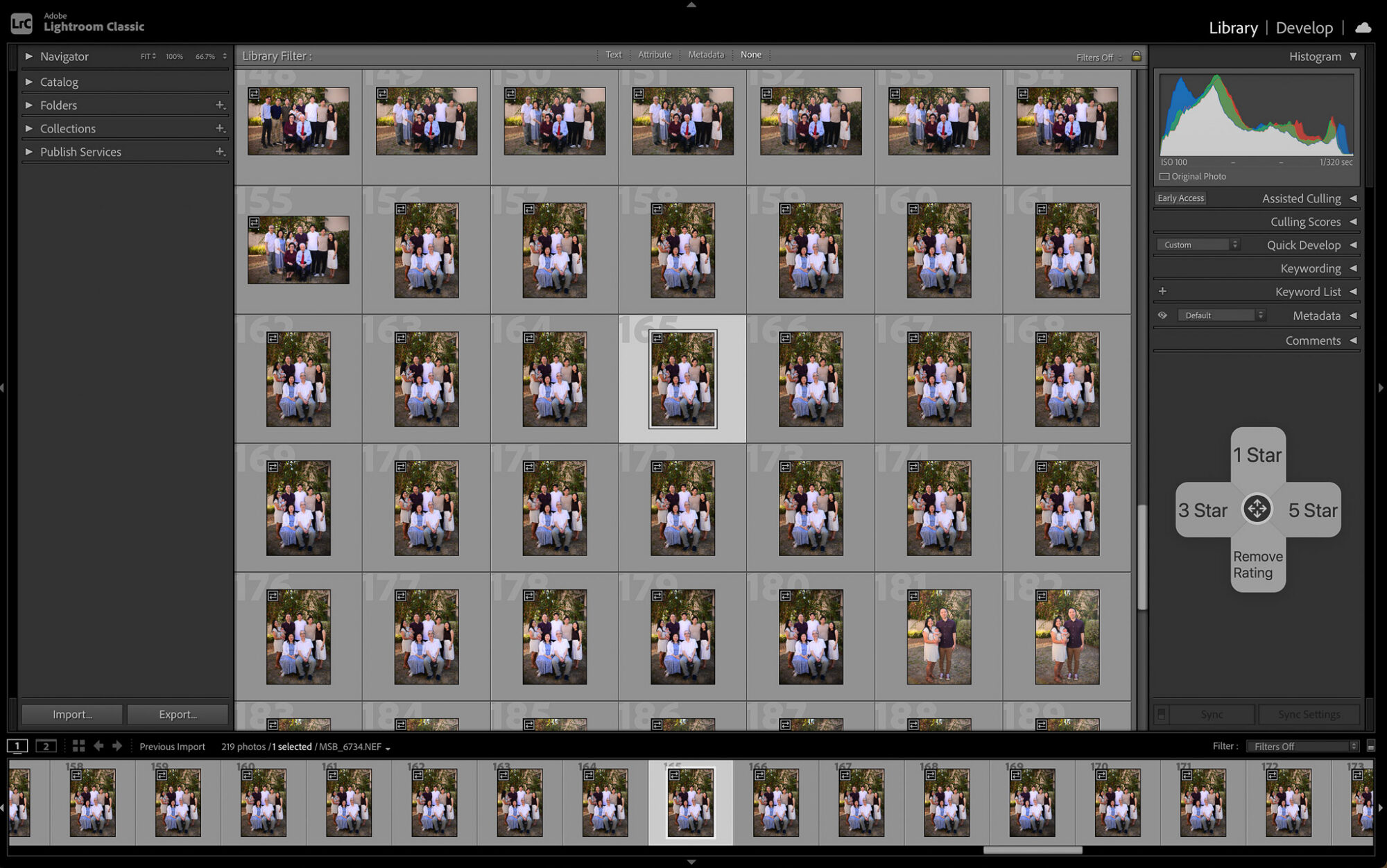
In portraits and weddings, you’re likely to have a workload in the range of hundreds or thousands of photos per week. (Even if you only count the delivered “keeper” photos, sometimes!) And yet, one of the key aspects of our own workflow is, applying at least basic color-correction and cropping to literally EVERY photo that our clients see.
It’s a simple process; making quick adjustments to exposure, white balance, and a little bit of highlight and/or shadow recovery. Plus, of course, we ensure the level cropping of any photo that has either a hard horizon (like the ocean) or strong vertical lines (like a downtown skyline)…
However, if you’re not careful, this basic level of editing could consume hours of your time every day. Thankfully, though, if you have the right tools (and a disciplined mindset!) it could be a matter of minutes.

Using the Dynamic Panel V2 to customize the editing tools we have at your fingertips on your TourBox, our whole process of basic color correction can be measured in a matter of seconds per image, not minutes. (Or, for the really tricky shots, maybe one minute or so… Yes, we’ve extensively clocked ourselves and averaged out the numbers across hundreds of thousands of delivered images!)
What about your workflow? Well, let’s see; do you start with a Lightroom preset to set your color-correction baseline, or apply a final stylized look? Dynamic Panel V2 can put any of your presets at your fingertips, or a whole folder of them. (See above) Or, maybe you are like me, and have a bit of OCD when it comes to making sure that every strong horizon is always level… Once again, the TourBox has controls for that, including a whole new Dynamic Panel dedicated to cropping. This means you can turn a knob to perfectly level a horizon, and also have things like aspect ratio (and locking) at your fingertips. Again, this is all possible in a totally de-cluttered work environment!

Personally, I love traditional tonal manipulation, so I’m often turning to the Tone Curve tool for my personal work. (See below; again, what a gorgeous full-screen editing environment!) Of course, for a wedding or portrait session, you probably shouldn’t treat every image like you’re Ansel Adams. Especially for high-volume weddings, we’re more likely to be skipping the Tone Curve tool and instead using the Color Grading interface.

Whichever tools you frequently use, being able to go through your photos in a rapid-fire manner while still achieving quality results is a gift that keeps on giving. For some, it might immediately add up to hours saved every day. In our experience, even a conservative estimate would be, you’ll shave hours off your workflow time each week.
There are two main aspects working in your favor here, when it comes to time savings: As we’ve described, the tools you likely reach for the most are given dedicated buttons and dials/sliders; this ability alone will speed you up. However, the Dynamic Panel V2 goes a step further, and follows you from tool to tool. (It even follows you to other apps, but that’s a whole different article!)
The end result is that whether you’re in Grid Mode and need to jump into leveling a tilted horizon, or you’re in full-screen Develop Mode and you want to jump from tweaking your WB to applying advanced Color Grading, there can be a hotkey for that, and the Dynamic Panel can automatically change the function of dials to suit the current tool.
Again, it certainly takes some getting used to, but it’s one of those things where once you get familiar with it, you’ll wonder how you ever lived without it.

One last key thing that I really like about TourBox Dynamic Panel V2 is this: the initial setup and advanced customization are as intuitive as they can be, which really helps tame the learning curve. Whether you’re just customizing the buttons, of you’re creating your own personalized set of edits to have available at the push of a button, …things are pretty much self-explanatory.
Just touch a button/dial/wheel, and in the Dynamic Panel it automatically selects that control so you can see what it currently does, and change that function if desired. Honestly, this is one of the smoothest learning curves I’ve experienced with any software in quite a long time!
Dynamic Panel V2 Review | Pros & Cons
The bottom line is this: with how much time you save, we think the Dynamic Panel V2 is a huge value to photographers. Especially any professional Lightroom user who needs to process greater volumes of images; even if the time saving was “just” hours per week or per month, it would be worth it, and yet, in our opinion a full-time pro is looking at a magnitude of hours saved every day. That’s huge.
For those who need more convincing, here’s the bullet point pros & cons as an overview:
Pros
- Reduces friction for virtually all tedious tasks
- High-volume workflows benefit the more you edit
- Seamless integration with both Lightroom Classic and Lightroom
- Physical controls also connect the artist with the creative work
- Updates & new features worth the investment/upgrade
- Physical device connection is simple, functional right out of the box
- Extensive customization for personalized workflow needs
Cons
- Significant time-saving tools always have an intimidating yet brief learning curve
- Every button being shaped differently might be an issue of personal preference
Advantages far outweigh any disadvantages, as you can see. I would be truly nit-picking to say, “some of the buttons are a little too small for my big clumsy fingers!” …but that’s about the worst thing I could think to say. Even then, I believe that most people will actually find it preferable to be able to memorize the feel of each button on the device. Also, I cannot emphasize enough just how perfectly sized the TourBox is for my work and my lifestyle; the device is portable enough to travel with, yet big enough that most of the controls don’t feel cramped.
The highlight of this review, though, is the Dynamic Panel V2, and what a leap forward it offers to all creative folks. I created a seamless workflow system using the extensive customization and useful new features like cropping and tone curve control, …and then suddenly without even thinking, I found myself using similar controls in DaVinci Resolve to cut up a video timeline and do tone curve color grading! I wanted to mention this last part because I know that even for someone whose entire income might be professional photography, there’s still a strong chance you’ll have some sort of social media presence that requires “content creation”, whether just for fun, or marketing your business, etc.
TourBox Dynamic Panel V2 Review | Conclusion

After editing literally millions of photos, our solution to the workflow conundrum is very straightforward: you need a streamlined system. (Yes, a clean, de-cluttered desk, also helps, and put your phone just out of reach in DnD mode, too!)
Personally, I myself managed the entire studio’s workflow for years, and to me, a tool like this is a holy grail. It makes my job easier in real, meaningful ways that result in me having more free time. Personally, I tend to lean more towards a simple look when editing; I believe that “timeless” is best. However, if I’m honest, I do have a weak spot for technical perfection, and that is where I once struggled to avoid spending an hour editing just one or two random photos. With a tool like the Dynamic Panel V2 and a TourBox Elite Plus, I feel like it’s actually FUN to “get the job done” with speed, while having even more creative control at my fingertips. You can learn more about TourBox Dynamic Panel V2 by clicking here.
Here’s the bottom line for you photographers out there: the more photos you need to edit, the more you need to check out TourBox Dynamic Panel V2. Whatever your creative style might be, and whichever version of Lightroom you use, Paired with the TourBox Elite Plus as your physical console, your professional workflow will finally feel complete. To check out your options, here is the information about pricing & availability.