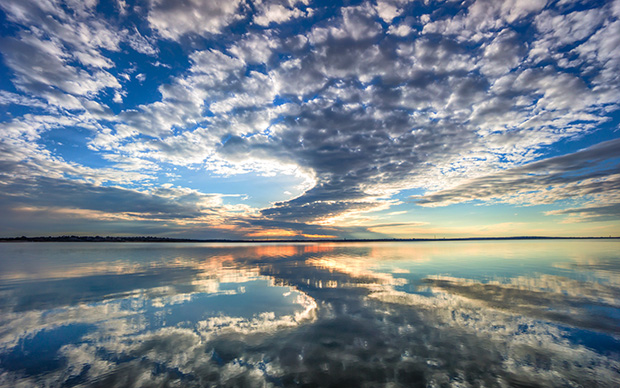
Here at SLR Lounge, we love it when we see HDR’s done well. For us this means choosing the right scenes, finding great compositions, and carefully utilizing tasteful processing. When I saw my friend Curtis Simmons, COO of StuckInCustoms post a recent image on his Google+, I asked if he would write a “How I Shot It” article about the image. The following article is what he wrote. Enjoy!
I live in Flower Mound which is a beautiful city situated north of the Dallas-Fort Worth area. We’ve enjoyed some amazingly great weather this winter with many days of cloudless sunny skies and unseasonably warm weather. Perhaps it’s the result of global warming but for now I’m enjoying every minute of it.
On this particular day a storm had passed through and left behind some great clouds. One of the earliest things I learned is that clouds can help to make a photo far more interesting. With the sunset just an hour away I jumped in my car and drove to the shore of Lake Grapevine that is near my home. When I arrived I was pleased to see the dramatic sky and how it was perfectly mirrored in the unusually still water. I quickly set up my camera and tripod, afraid that the moment would pass before I could capture it.
I shoot with a Sony NEX-7 which supports three exposure auto-bracketing. I set the camera to take shots at -2, 0, and +2 EV. I used the new Sony 10-18mm F/4 wide-angle lens which is excellent for landscapes.
I loaded the RAW files in Lightroom, picked my favorite set and exported the three images to Photomatix Pro to create an HDR image.
Under Exposure
Settings: Aperture Priority, F/4, 10mm, ISO 200, -2.0 EV

Middle Exposure
Settings: Aperture Priority, F/4, 10mm, ISO 200, 0.0 EV

Over Exposure
Settings: Aperture Priority, F/4, 10mm, ISO 200, +2.0 EV

The Final Image

There was some slight movement in the water so the resulting image from Photomatix was not as crisp as the actual scene. So using Lightroom I took the middle exposure, sharpened up the water, tweaked the colors and added some drama to the sky. I then took the image from Photomatix and the tweaked image from Lightroom into Photoshop. Using a layer mask I brought in the glassy detail of the lake and dramatic clouds. This was the end result.
Full size image:
Click Here to View the Full Sized Image
About Curtis Simmons
Curtis Simmons, COO, StuckInCustoms jack of all trades, master of some. He has 2 kids, 2 dogs and 1 wife. You can find him on his blog, Facebook and Google+.