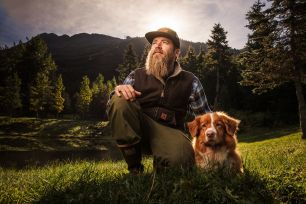
How to Create a Vintage Cross Processed Photo in Lightroom – Lightroom Video Tutorial


lightroom vintage cross process tutorial lightroom video tutorial How to Create a Vintage Cross Processed Photo in Lightroom   Lightroom Video Tutorial

(The Lightroom video tutorial in this post is just under the introductory text below. The working files for this Lightroom video tutorial can be found just above the video. So that we can keep on providing free paid-quality content, please share these videos and raise awareness of SLR Lounge by Facebooking or Tweeting the site and articles, thank you!)

As cameras produce higher and higher quality of images, the desire for creating vintage and lo-fi looking images seems to increase as well. Regardless of why, the vintage cross processed look has become quite popular today.

In this Lightroom video tutorial, we are going to teach you how to create a vintage cross processed look without having to touch Photoshop at all. Now, while we will have more flexibility and control in Photoshop, I think you will find that Lightroom does a fabulous job creating this effect as well.

To see all Before and After versions of each image from this tutorial, please visit the Photo Album on the SLR Lounge Facebook Page.

Enjoy the Lightroom tutorial. Once you try out this technique on your own, be sure to upload your photos to the comments on this article, or to our Facebook page so we can see how you put these techniques into action!

Exercise File Download Links:

Note: These images have been provided to the SLR Lounge users curteousy of Lin and Jirsa Photography for educational purposes only. They may not be used in any other manner outside of these SLR Lounge learning videos without the express written consent of Lin and Jirsa Photography. Thank you.

Full RAW Exercise Files (265MB) – For faster connections. The full RAW files will allow you to follow the tutorials while achieving the exact same results as shown.
JPEG Exercise Files (24MB) – For slower connections. The JPEG files will allow you to follow the tutorials, although the results may vary due to not having the image details of the full RAW file.


Related Product Offers Recommended by SLR Lounge

lightroom3 retail box image How to Create a Vintage Cross Processed Photo in Lightroom   Lightroom Video Tutorial1) Adobe Photoshop Lightroom 3 – As of April 4, 2011 – Among the larger reputable dealers, the lowest price we found for Adobe Photoshop Lightroom 3 is $236.99 (Free Shipping) through Amazon. Click any of these links to take you to the offer.

Click here to purchase Adobe Lightroom 3 from Amazon.com

2) Student and Teacher Editions of Adobe Photoshop Lightroom 3 – For teachers and students, Adobe Photoshop Lightroom 3 is available for $89 through the Adobe Educational Purchasing Site.

Post Production Pye
SLR Lounge Senior Editor
Partner of Lin and Jirsa Photography

Like this post? Share it!

  • Tweet
  • Facebook
  • Diggit
  • Delicious
  • Diggit
  • Diggit

  • http://www.weddinglightroom.com.au Peter

    I just followed your instructions to a tee and my image is looking very vintage cross-processed.  thanks for another great tutorial.

  • http://www.facebook.com/PyeJirsa Payam Jirsa

    Sure thing Peter, enjoy and be sure to share ;)

  • Anonymous

    You write nice story, You give nice tips.Thanks for sharing information.

    wedding photographers bristol

  • Qué flash!!!

    Thank you

    WONDERFUL!!!

    And I can’t believe you use Windows. Someone’s gonna kill you XD.

    Thanks a lot

  • Anonymous

    Thanks alot. This was great!

  • Ryan Phillips

    Amazing tutorial. just came across this site a few days and haven’t been able to get off it!!! 

    I have had a good bash at this with one of my street portrait images… would love you guys to have a look and let me know your thoughts. 

    I have done 95% of my work in Lightroom but my airbrushing was done in CS5 

    There are a few issues i have with this image which i am unsure on how to correct at the moment 

    - reflection bounce in her eyes 
    - slight tinge of purple in her hair?? when looking at the original is seems to be their but not as prominent. 

    image attached 

    large can be found on Flickr http://www.flickr.com/photos/rebecca_ryan/6776788825/in/photostream/lightbox 

RELATED ARTICLES


  1. Vintage Cross Processed Look – Weekly Lightroom Edit w/ Post Production Pye – Episode 4
  2. Vintage Cross Processing in Under a Minute – Photoshop Curves Video Tutorial
  3. How to Create Split Tone and Duotone Black and White Images in Lightroom – Lightroom Video Tutorial
  4. How to Create and Manage Snapshots – Lightroom 3 Video Tutorial
  5. How to Create a Lens Baby / Tilt Shift Effect in Lightroom – Lightroom Video Tutorial

Write Photography Tips


SLR Lounge is a resource for photography tutorials, photo news, camera reviews and more. We're in search of writers to cover a range of topics. Click to learn more about our jobs.

SUBSCRIPTIONS


Polls


What Type of Photographer Are You?

View Results

Loading ... Loading ...