If you’ve ever spent hours (or days) culling thousands of wedding, portrait, or event images, you know the pain. And while plenty of tools promise faster culling, most miss the mark, sacrificing emotion for efficiency or forcing you to switch apps and break your workflow. Impossible Things is aiming to change that with a culling solution that is actually designed by photographers. It runs natively inside Lightroom Classic, understands moments (not just megapixels), and delivers context-aware selections without over-culling your creative work. The feature is currently in beta and available as part of Impossible Things Unlimited Plan. After putting it to the test, here are five reasons to give it a serious look.
1. Runs Inside Lightroom Classic
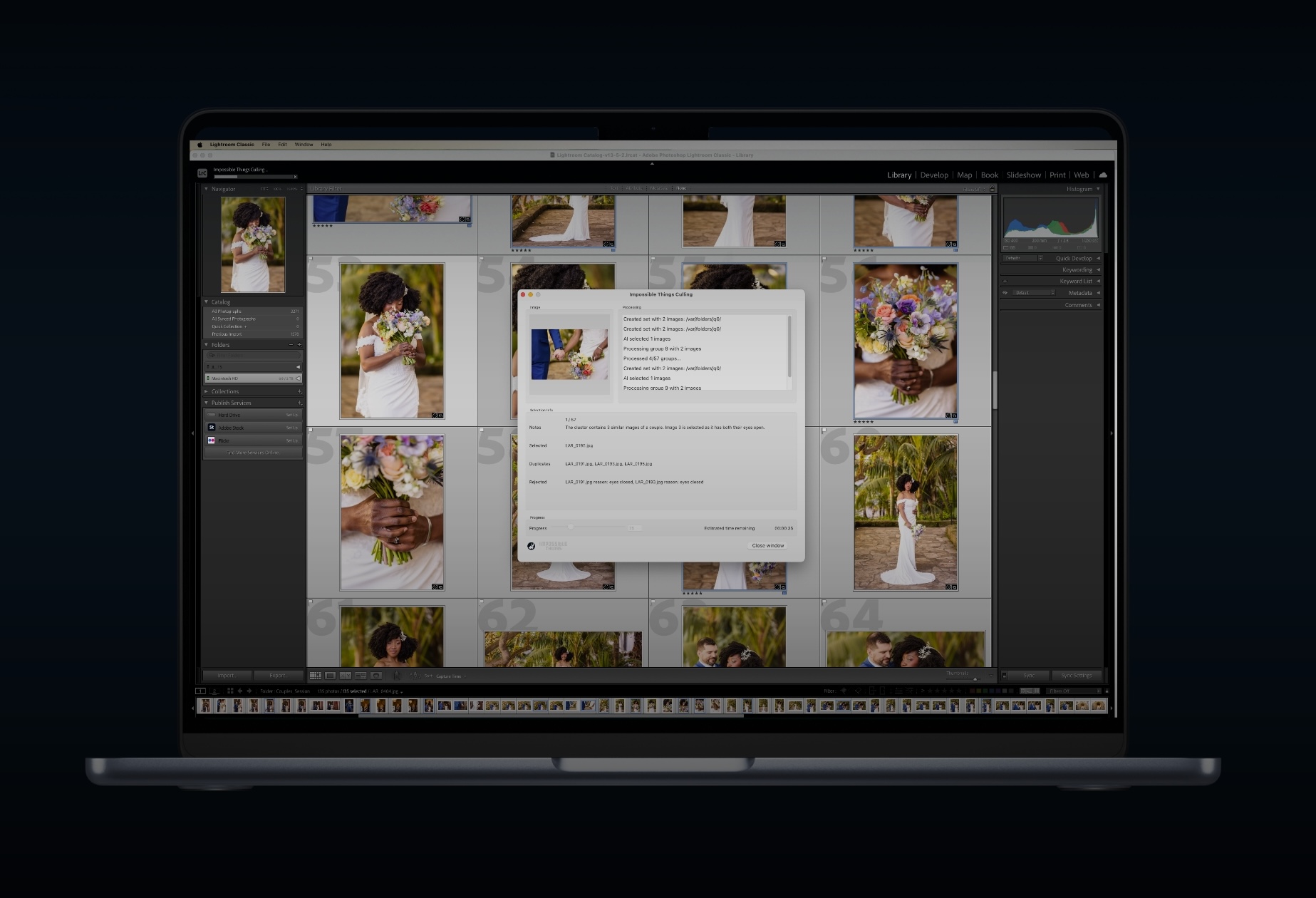
One of our favorite features of Impossible Things is that it works natively in Lightroom Classic. Naturally, when adding AI Culling to the tool chest, Impossible Things integrated the feature right into the plugin as well. In other words, you do not have to switch between apps, export files, or take any other extra steps to cull (or edit) your images. This also means that you don’t have to waste time learning a new platform or disrupting your existing workflow. Everything happens in place, using your existing catalog and collections.
To launch it, just select your images and go to: File > Plug-in Extras > Impossible Things > Cull Photos. From there, you’ll quickly select your rating filters, and then AI will handle grouping, selection, and organization, all while preserving the structure of your Lightroom catalog.
Why it matters: If you already rely on Lightroom Classic for editing, Impossible Things feels like a natural extension rather than a separate tool.
2. Understands Moments and Emotion
Most AI tools look for sharp eyes and clean exposures. Impossible Things’ Culling feature looks for stories. This may sound like a stretch, but there’s a reasonable explanation for how it works. Impossible Things uses contextual intelligence to evaluate what’s happening in each photo, moving beyond how your photos look in a technical sense. It recognizes elements that differentiate between ceremonies, receptions, couple’s sessions, or other events, and it selects images accordingly.
Here’s an example:
We would normally rate an image in which the subject’s eyes are closed as being unusable. But what if the subject’s eyes are closed during a kiss? Because the Culling feature uses contextual intelligence, the image with closed eyes in this instance would be kept. An image with half-blinked eyes in a group portrait, however, would not make the cut and would be rejected.
Why it matters: Storytelling isn’t always tack-sharp. Preserving meaningful frames that others might reject is where this AI starts to feel more like a second shooter than a filter.
3. Saves to Smart Collections (Selected, Duplicates, Rejected)
Once culling is complete, Impossible Things automatically organizes your images into Smart Collection, which speeds up the review and editing process.
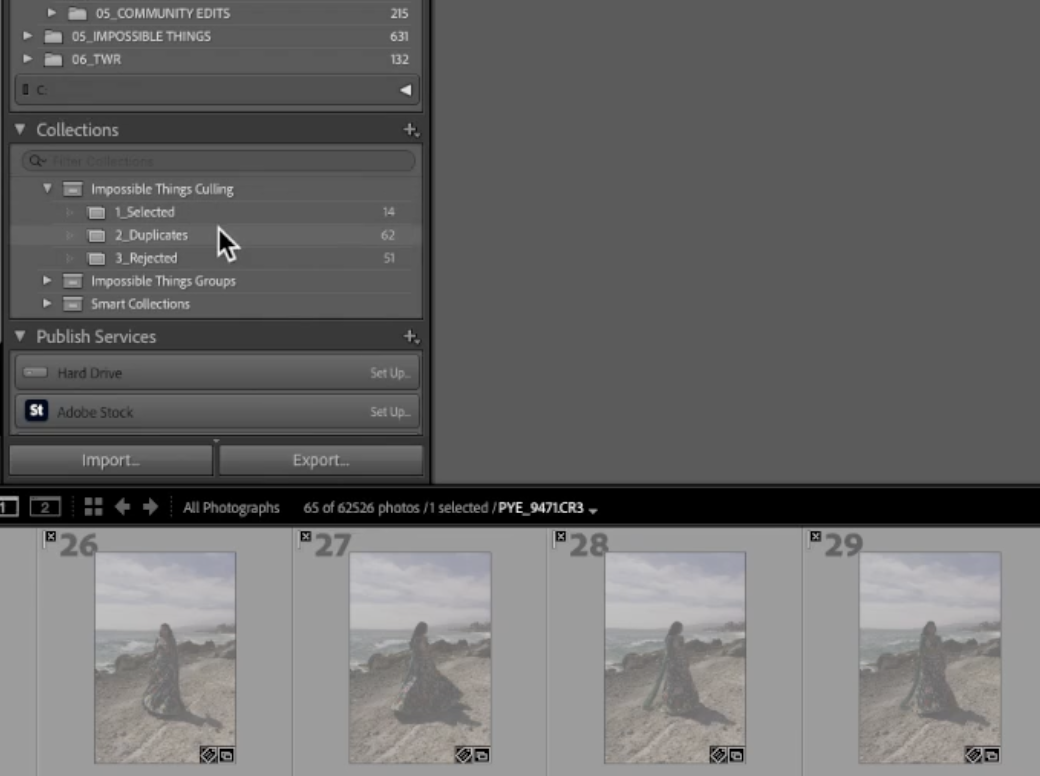
Here’s a quick breakdown of the different groupings:
- Selected – The strongest image(s) from each group or moment
- Duplicates – Technically similar images, flagged but not deleted
- Rejected – Clearly unusable shots based on your preferences
Collections are named and grouped logically (e.g., “Reception Toasts,” “Portraits”), helping you see the narrative flow of the shoot at a glance.
Why it matters: The organization here isn’t just convenient; it actually saves hours of manual sorting and gives you a clear path from culling to editing.
4. Delivers a Transparent Culling Report

Every photographer wants speed, but very few would prioritize speed at the expense of control. That’s why Impossible Things generates a Culling Report after each session. This optional summary outlines why each image was chosen, grouped, or rejected, based on key factors like focus, composition, expressions, and group dynamics.
Think of it like notes from an intelligent assistant: “This image was selected for sharpness and stronger expression compared to the other frames in this group.”
Why it matters: Explainable AI is designed to allow photographers to maintain full confidence and never feel like decisions were made blindly.
5. It Doesn’t Over-Cull
If you’ve tried other culling software, you’re probably aware that it can sometimes get too aggressive and throw away the very frames that make a set unique. Impossible Things is designed to lean on a photographer’s bias for creativity, meaning it errs on the side of keeping too much rather than too little. A slightly out-of-focus hug, or a weird-but-wonderful in-between moment might make it afterall if it matters to the story.
Why it matters: You stay in control. The AI handles the heavy lifting but always respects your creative judgment.
Final Thoughts: Built for Real-World Photographers
Impossible Things AI Culling isn’t about replacing photographers. In fact, it’s more about amplifying your speed and decision-making. Whether you’re editing a short mini-session or thousands of wedding images, this plugin can potentially trim hours off your workflow. As we mentioned, it’s fast, context-aware, and runs natively inside Lightroom Classic. All good things.
If you haven’t tried Impossible Things, or if you were an early user but stepped away, now’s a great time to give it a shot. The AI has come a long way, and features like Culling Reports, Smart Collections, and Emotion-Aware selections make it possible for the software to get closer than ever to editing like you while still leaving you in the driver’s seat.