
Welcome to SLR Lounge’s Ultimate Photoshop Texturing Tutorial. A while back, we created a written texturing tutorial. I felt like it was about time to take that tutorial and turn it into a video adding additional techniques along the way.
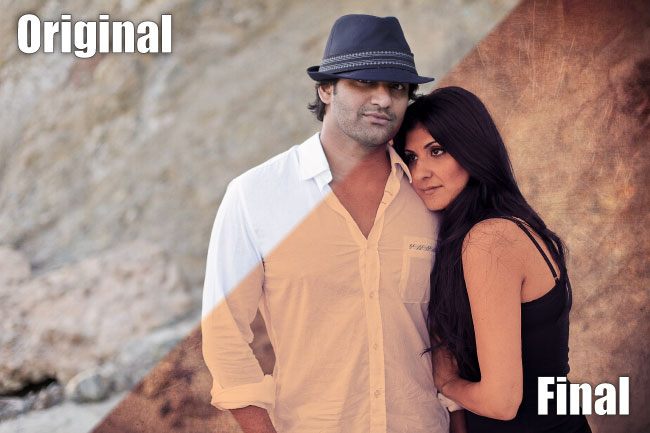
In this Photoshop video tutorial, we are going to show you how to texture an image in Photoshop the correct way using Averaging instead of using Layer Masks to remove textures over our subjects.
We will use our base image file, along with two different textures, all of which are downloadable below in the exercise files. After we texture our image, we will add several Layer Adjustments to finalize our image.
If you would like to see the full original and final images from this tutorial, please visit the SLR Lounge Facebook Photo Album.
As always, enjoy and share the love! =)
Download Exercise Files
To download the working file used in this tutorial, click here. (Note: This image is provided by Lin and Jirsa Photography for educational purposes only, it may not be used for any other commercial or non-commercial purpose without the express permission of Lin and Jirsa Photography.)
How to Texture an Image in Photoshop
Related Product Offers Recommended by SLR Lounge
 1) Adobe Photoshop CS5 – Buy the full version of Adobe Photoshop CS5 at at Amazon (free shipping) Click any of these links to take you to the offer.
2) Adobe Photoshop CS5 Student and Teacher Edition is also available through Amazon, click here to take you to the offer.
More Info
If you’ve enjoyed this tutorial, be sure to check out our Photoshop Paper Textures in our Store! See the trailer below.
Click to Subscribe!
Post Production Pye
SLR Lounge Senior Editor
Partner ofLin and Jirsa Photography
Post Production Pye
SLR Lounge Senior Editor
Partner ofLin and Jirsa Photography



Get Connected!